The end of the loading spinner: 100,000 rows with Server-Sent Events
Big reports don't have to freeze the screen. How SorlaDB streams data in blocks so people start working in the first second, and why it needs no new infrastructure.


It's Monday, 9:02 in the morning. An operations director opens the orders report to decide which deliveries need attention this week. The screen goes white. A spinner appears. Ten seconds. Twenty. At forty seconds the browser asks whether it should stop the page.
She doesn't wait. She calls an analyst and asks for "that spreadsheet from last week". The decision gets made on stale data, and nobody files a bug, because "the report is just slow".
Most teams have a screen like that. Nobody planned for it: the data simply grew faster than the way we load it. This post is about fixing that without a new platform, a new vendor or a rewrite.
Why big screens freeze
The usual way to load a report is one request and one big answer: the server collects every row, turns it into one huge JSON document, and sends it. The browser can't show anything until the last byte arrives, then it parses everything at once, and that is when the page freezes.
Three things go wrong with that model:
- Nothing is useful until everything arrives. Row 1 waits for row 100,000.
- Parsing a giant payload blocks the screen. Scrolling and clicking stop while the browser digests it.
- One dropped connection means starting over. On a train, a hotel Wi-Fi or a busy VPN, a 40-second download is a coin toss.
The idea: deliver in boxes, not in one truck
When you move a warehouse you don't wait for one giant truck to be fully loaded before anything leaves. You send boxes. The first ones arrive while the rest are still being packed, and if one box gets lost you resend that box, not the whole warehouse.
Server-Sent Events (SSE) is that idea, built into every browser. The server keeps one ordinary HTTP response open and writes the data in blocks, for example 5,000 rows at a time. SorlaDB receives each block and adds it to a collection the interface can already query.
What changes for the business
- People start working in the first second. The first block appears almost immediately and the rest keeps arriving while they scroll, search and filter.
- Visible progress replaces uncertainty. "Loading 20,000 of 100,000 rows…" is a promise kept. A spinner is a question nobody can answer.
- Bad networks stop costing work. If the connection drops, the browser reconnects and the server continues from the last block it delivered.
- No new infrastructure. SSE is plain HTTP. It goes through the proxies, load balancers, authentication and monitoring you already run. There is no message broker to buy and no new protocol for security to approve.
How it works
The protocol is a handful of named events. The server announces the total, sends the rows in numbered blocks and says when it is done:
event: meta
data: {"total": 100000}

id: 1
event: rows
data: [{"_id": 1, "customer": "ACME", "status": "late"}, … 5000 rows …]

id: 2
event: rows
data: [ … ]

event: end
data: {}
In the browser, one call starts the stream and keeps the collection up to date:
const app = new sorla();
app.useDb('reports');
app.db.createCollection('orders');

const loading = app.db.orders.stream('/api/orders/stream', {
  headers: { Authorization: `Bearer ${token}` },
  onProgress: ({ loaded, total }) => (bar.value = total ? loaded / total : 0)
});

// The interface can query while the data is still arriving
app.db.orders.find({ status: 'late' }).sort({ due: 1 }).limit(50).toArray();

const state = await loading.done; // { loaded, total, blocks, errors, … }
Each block is stored with a single bulkWrite. Rows are matched by _id, so a block sent twice after a reconnection updates rows instead of duplicating them.
On the server, the important details are sending the block number as the event id, and slowing down when the browser reads slower than the server writes:
import http from 'node:http';

http.createServer(async (req, res) => {
  if (req.url !== '/api/orders/stream') return res.end();
  res.writeHead(200, { 'Content-Type': 'text/event-stream', 'Cache-Control': 'no-cache' });

  const orders = await loadOrders();                      // your data source
  const size = 5000;
  const resumeAt = Number(req.headers['last-event-id'] ?? 0); // blocks the browser already has

  res.write(`event: meta\ndata: ${JSON.stringify({ total: orders.length })}\n\n`);
  for (let block = resumeAt; block * size < orders.length; block++) {
    const rows = orders.slice(block * size, (block + 1) * size);
    const ok = res.write(`id: ${block + 1}\nevent: rows\ndata: ${JSON.stringify(rows)}\n\n`);
    if (!ok) await new Promise((resolve) => res.once('drain', resolve)); // the browser is slower: wait
  }
  res.end('event: end\ndata: {}\n\n');
}).listen(3000);
When the connection drops, the browser reconnects and sends Last-Event-ID. The server skips the blocks that already arrived, and nobody downloads them twice.
In a real product: Intelligent Grid
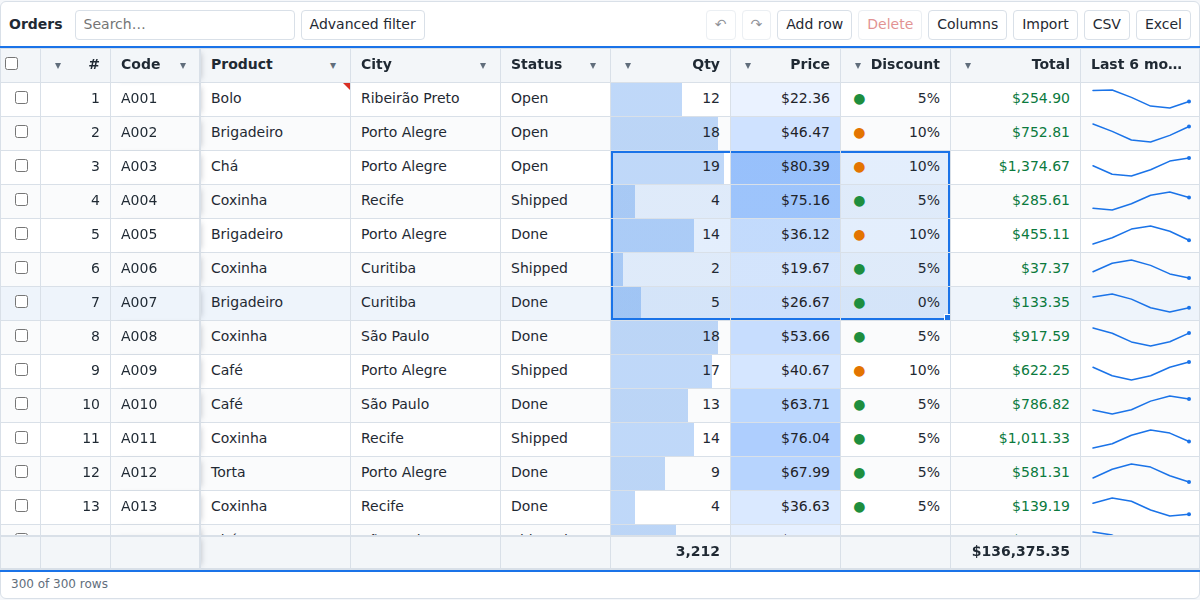
Intelligent Grid, our Excel-like data grid built on SorlaDB, uses exactly this to load large datasets. One line starts the load:
const stream = grid.loadStream('/api/orders/stream', { onProgress: updateBar });
Rows show up as each block arrives, the status bar reads "Loading 20,000 of 100,000 rows…", and the user can sort and filter while it loads. Because only the visible rows are drawn, 100,000 rows scroll at a steady 60 frames per second in our benchmarks.
When to use it, and when not to
- Small data: a plain
fetchis still the simplest answer. SSE is an alternative, not a replacement. - Large reports, exports and dashboards: SSE shines. Tens or hundreds of thousands of rows, with progress and resuming.
- Data that changes while people look at it, or infinite scroll on demand: that is a job for a WebSocket, the subject of our next post.
The takeaway for leaders
The slow report is rarely a hardware problem. It is a delivery problem: we ship everything at once and make people wait for the last row. Sending data in blocks turns a 40-second wait into a first-second start, keeps working through bad networks, and runs on the HTTP infrastructure you already pay for.
If your team has a screen that people avoid because it is slow, that screen is a good place to start. The server sync guide has everything your developers need, and SorlaDB is open source on GitHub.