
Your users already know how to use it: meet Intelligent Grid
The most-used feature in many business systems is the "Export to Excel" button. Intelligent Grid brings the spreadsheet inside your product, built on SorlaDB: 100,000 rows at 60 fps, 137 Excel functions and live data, in 56 kB.

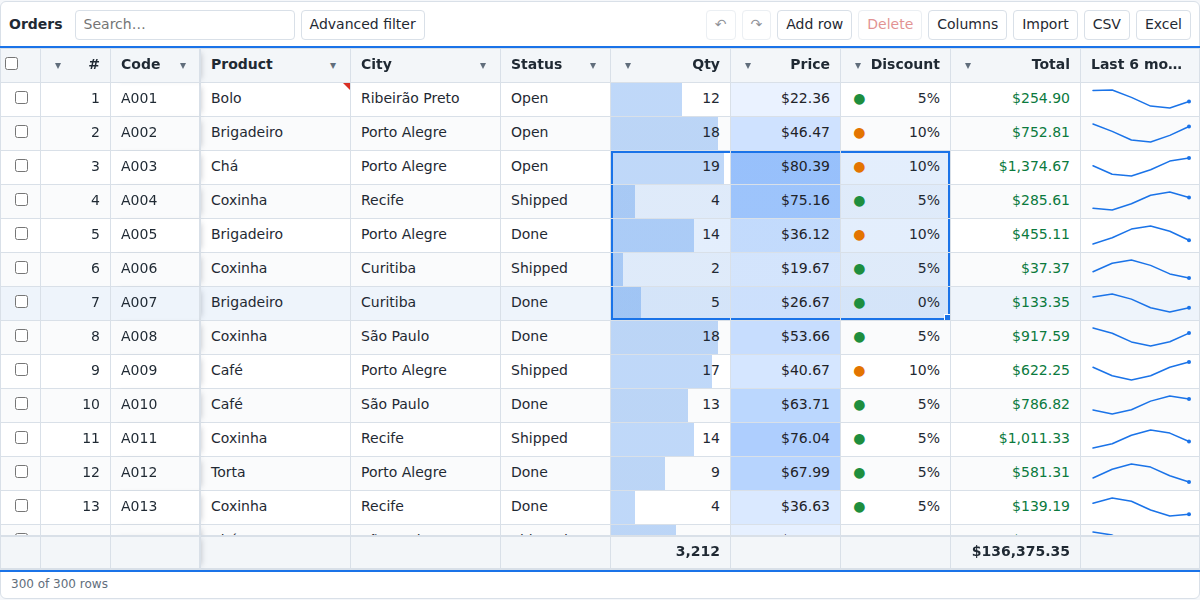
Ask any finance or operations team which button they click most in your system. In a surprising number of companies, the honest answer is Export to Excel.
It is not that people love exporting. It is that the screen in front of them can't do what they need: sum a filtered column, try a formula, paste a block from another sheet, undo a mistake. So the data leaves the system, and every export becomes a copy you no longer control. By Friday there are five versions of the same report in five inboxes, none of them current, one of them with customer data that should never have left the building.
Teams try to fix this by building "a better table". Months later they have sorting, a filter or two, and a backlog full of requests that all sound like "can it work like Excel?".
Intelligent Grid is our answer to that request: an Excel-like data grid for the browser, open source and built on SorlaDB.
What changes for the business
- No training. Ranges, the fill handle, Ctrl+C / Ctrl+V from Excel, undo, find and replace, AutoFilter. People use it on the first day because they have used it for years.
- The data stays inside the system. Formulas, totals, grouping and subtotals happen in the product, with your permissions and your audit trail. When someone does need a file, the XLSX export keeps real Excel formulas, not pasted values.
- Fast with real volumes. 100,000 rows open in under half a second and scroll at 60 frames per second, because only the rows on screen are drawn.
- Less to build and maintain. One component, 56 kB gzipped, MIT licensed, with TypeScript types and labels in English and Portuguese. Your team spends its time on the business rules, not on reinventing a spreadsheet.
A spreadsheet, for real
This is a sortable, filterable, editable grid with a calculated column, totals, data bars, undo, Excel copy and paste, CSV and XLSX export and virtual scrolling:
import { IntelligentGrid } from '@andmarruda/intelligent-grid';
import '@andmarruda/intelligent-grid/styles.css';
import sorla from 'sorla-db';

new IntelligentGrid('#orders', {
  sorla,
  idField: 'id',
  editable: true,
  data: await fetch('/api/orders').then((r) => r.json()),
  columns: [
    { field: 'product', title: 'Product', validate: { required: true } },
    { field: 'qty', title: 'Qty', type: 'integer', footer: 'sum', conditionalFormats: [{ type: 'dataBar' }] },
    { field: 'price', title: 'Price', type: 'currency' },
    { field: 'total', title: 'Total', type: 'currency', formula: '=[@qty]*[@price]', footer: 'sum' }
  ]
});
Formulas use structured references, the way Excel tables do. There are 137 functions, from SUMIFS and XLOOKUP to NETWORKDAYS, and users can type =… in any editable cell:
columns: [
  { field: 'share', type: 'percent', formula: '=[@total]/SUM([total])' },
  { field: 'status', formula: '=IF([@total]>1000,"VIP",IF([@total]>100,"Regular","Small"))' },
  { field: 'late', type: 'boolean', formula: '=AND(NOT([@paid]),[@due]<TODAY())' }
]
Filters people understand, queries your backend can run
Besides Excel's AutoFilter and a search box, there is a visual query builder with nested AND / OR / NOT groups. The interesting part is what it produces: a MongoDB-style find() query.
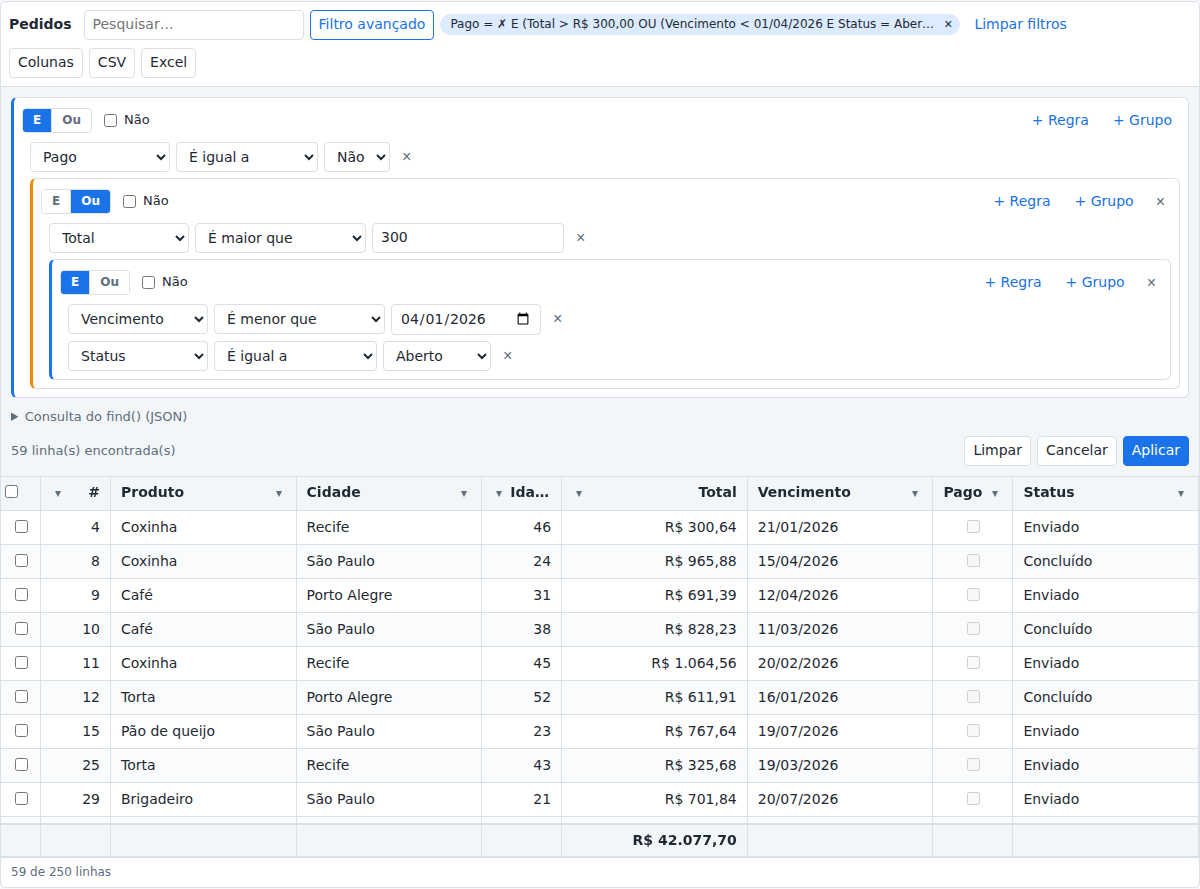
grid.toSorlaQuery();
// { $and: [{ paid: false }, { $or: [{ total: { $gt: 300 } }, { $and: [ … ] }] }] }
That JSON runs as is in SorlaDB on the client, and in MongoDB or SorlaDB on your server. The filter a manager builds on screen is the same query your API executes. Nobody has to translate it.
Built for forms and APIs
Every edit, paste, insert and delete is tracked, so saving means sending only what changed, not the whole table:
grid.getChanges();
// { inserted: [ … ], updated: [{ id: '1', changes: { qty: { from: 2, to: 4 } }, row: { … } }], deleted: [ … ] }

await api.save(grid.getChangesJSON());
grid.acceptChanges(); // the saved values become the new original
Live data, big data
Intelligent Grid speaks the same server protocols as SorlaDB:
- Infinite scroll over
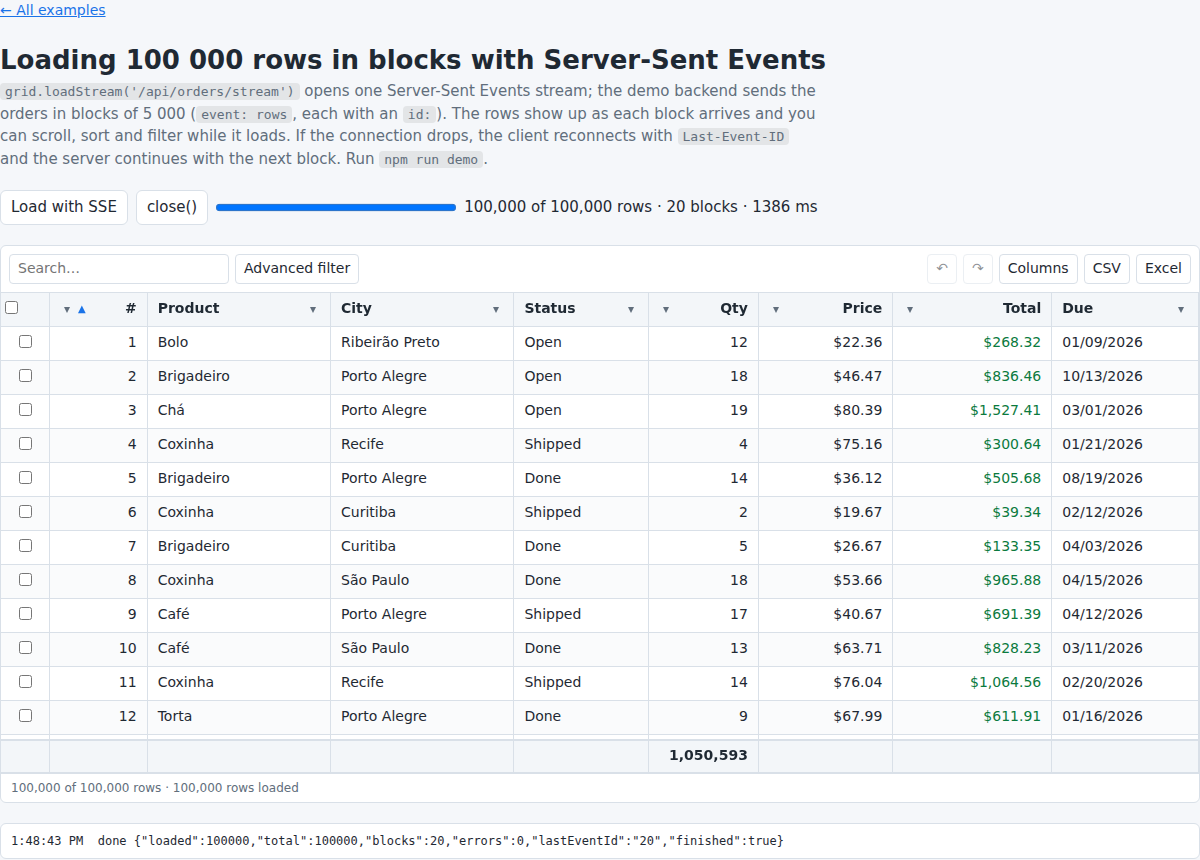
fetchor a WebSocket, with sorting and filters sent to the server asfind()JSON, and rows changed by other users updated in place. If someone has an unsaved edit in that row, their value is kept. (Live data with WebSockets) - Server-Sent Events to load 100,000 rows in blocks of 5,000, with progress, while the user already sorts and filters. (The end of the loading spinner)
The story behind the numbers
Intelligent Grid started as the toughest test we could give SorlaDB. We built it on SorlaDB 1.0, and it immediately found 16 problems in the library, from sorting that always threw an error to nested queries that crashed.
Every one of them was fixed in SorlaDB itself, between versions 1.1 and 1.7.1, and the SorlaDB test suite grew from 45 tests to 227, including 500 random nested queries checked against a reference implementation. You can read the whole list in the changelog.
Those fixes, together with two changes in the grid itself (computing whole-column formulas once instead of once per row, and drawing only the visible rows), show in the benchmarks. Same 12-column scenario, with formulas that depend on every row:
| 100,000 rows | before | after | |
|---|---|---|---|
| open the grid | 237.9 s | 447 ms | 532× faster |
| edit a cell and recalculate | 84.5 s | 200 ms | 422× faster |
| scroll | 60 fps | about 30 rows in the DOM |
That is the part we are proudest of: building a real product on SorlaDB made SorlaDB better for everyone who uses it.
The takeaway for leaders
If your most important screens end with "Export to Excel", the export is not the feature people want. It is a symptom. Give them the spreadsheet inside the product and you get faster work, data that stays governed, and a team that stops rebuilding tables.
Intelligent Grid is open source under the MIT license. Install it with npm install @andmarruda/intelligent-grid sorla-db, and find the full documentation, in English and Portuguese, on GitHub.

