No more refresh button: live data with WebSockets
When several people work on the same data, a stale screen costs money. How SorlaDB keeps every screen current over one WebSocket, with infinite scroll, reconnection and no lost edits.


At 4:15 on a Friday afternoon, two sales reps in two different cities look at the same inventory screen. Both see one unit left of the product their customers want. Both close the deal. On Monday, one customer gets an apology instead of a delivery.
Nobody did anything wrong. Each screen was correct when it loaded. It just stopped being correct a few minutes later, and nothing told them.
Teams usually live with this by training people to press the refresh button, or by having the screen ask the server "anything new?" every few seconds. The first relies on memory. The second costs servers and still arrives late.
The real problem: screens that go stale
Any screen shared by several people has the same weakness: it is a photograph of the data at the moment it loaded. Orders change status, prices are corrected, someone else edits the same record. The longer the screen stays open, the further the photograph drifts from reality.
The common workarounds all have a price:
- The refresh button depends on people remembering to press it, and it reloads everything to change one row.
- Polling (asking every few seconds) multiplies requests by the number of open screens, mostly to hear "nothing changed", and changes still show up seconds late.
- Locking records avoids conflicts by making people wait for each other.
The idea: one open line in both directions
A WebSocket is a phone line that stays open between the browser and the server. The screen asks for what it needs over that line, a page of orders for example. The server answers on the same line and also calls back when something changes, without being asked.
SorlaDB speaks this protocol out of the box. The rows that arrive, whether you asked for them or the server pushed them, go straight into a collection. Every part of the interface watching that collection updates itself.
What changes for the business
- Decisions on current data. When a row changes on the server, it changes on every open screen within moments, not when someone remembers to refresh.
- Fewer conflicts and do-overs. People see each other's changes as they happen, so promises like the last unit in stock are made on facts.
- Less waste than polling. One quiet connection replaces a steady stream of "anything new?" requests, and the server only speaks when there is news.
- It survives real networks. If the connection drops, SorlaDB reconnects on its own and catches proxies that silently kill idle connections. Users see "reconnecting…", not a broken page.
How it works
The browser opens one connection, asks for pages as the user scrolls, and listens for changes:
const app = new sorla();
app.useDb('sales');
app.db.createCollection('orders');

const remote = app.db.orders.connect('wss://api.example.com/ws/orders');

// A page for the infinite scroll: { rows, hasMore, total }, also stored in the collection
await remote.load({ offset: 0, limit: 200, query: { status: 'open' }, sort: { due: 1 } });

remote.on('push', ({ message }) => notify(`Orders updated by someone else (${message.type})`));
remote.on('close', () => (status.textContent = 'reconnecting…'));

// The interface only watches the collection; loads and pushes update it
app.db.orders.watch({ status: 'open' }, { sort: { due: 1 } }).subscribe(render);
The protocol is plain JSON with a type. The client sends { type: 'load', id, offset, limit, query, sort }, and the server answers { type: 'reply', id, rows, hasMore, total }. The server can push { type: 'rows', rows }, { type: 'delete', ids } or a list of ops at any moment, and SorlaDB applies them to the collection.
The server can use the very same query language to build each page. Here it uses SorlaDB too, and MongoDB would accept the same query:
import { WebSocketServer } from 'ws';

const sockets = new WebSocketServer({ port: 3001, path: '/ws/orders' });

sockets.on('connection', (socket) => {
  socket.on('message', (raw) => {
    const message = JSON.parse(raw);
    if (message.type === 'ping') return socket.send(JSON.stringify({ type: 'pong' }));
    if (message.type === 'load') {
      const { offset, limit, query = {}, sort = {} } = message;
      const rows = db.orders.find(query).sort(sort).skip(offset).limit(limit).toArray();
      const total = db.orders.count(query);
      socket.send(JSON.stringify({ type: 'reply', id: message.id, rows, total, hasMore: offset + rows.length < total }));
    }
  });
});

// Whenever an order changes, anywhere, every open screen hears about it
export function broadcast(order) {
  const message = JSON.stringify({ type: 'rows', rows: [order] });
  for (const client of sockets.clients) client.send(message);
}
The details that make it production-ready come built in:
- Requests made while the connection is opening are queued and sent when it opens.
- After a drop, SorlaDB reconnects with growing pauses: 500 ms, 1 s, 2 s… up to 30 s.
- A heartbeat every 25 seconds detects connections that a proxy closed without telling anyone.
- Replies that never come time out after 30 seconds instead of hanging forever.
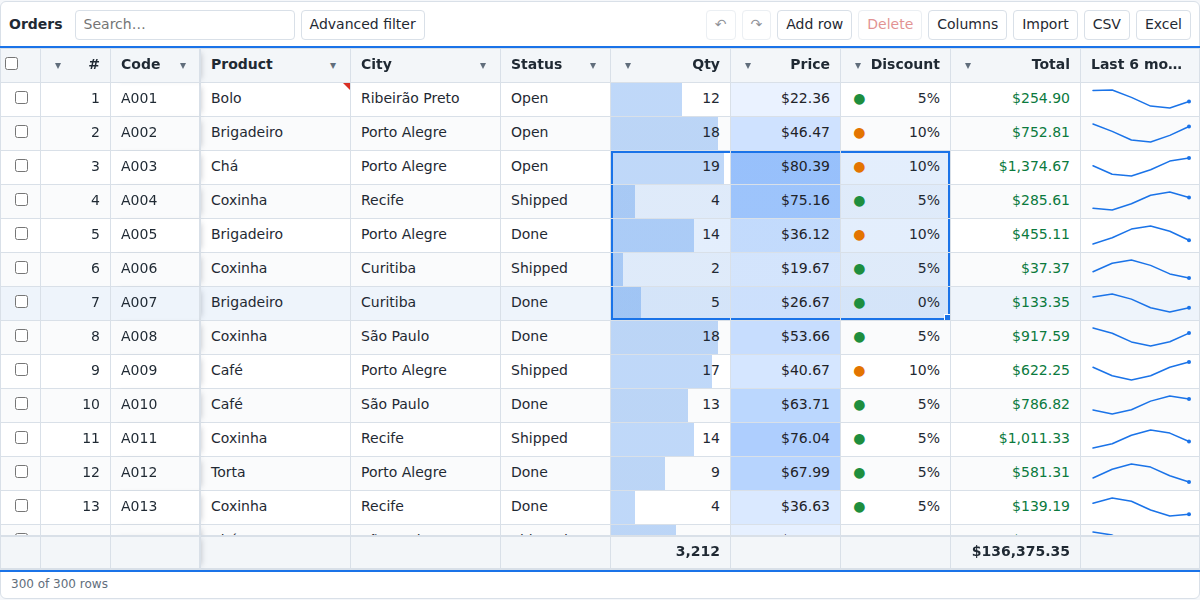
In a real product: Intelligent Grid
Intelligent Grid, our Excel-like data grid built on SorlaDB, turns this into one option:
const socket = sorla.connect('wss://api.example.com/ws/orders');
const grid = new IntelligentGrid('#orders', { idField: 'id', columns, append: { pageSize: 100, socket } });
Pages load as the user scrolls, with sorting and filters sent to the server. When another user changes a row, it updates in place. And if the current user changed a field of that row and hasn't saved yet, their value is kept: unsaved work is never overwritten by someone else's change.
WebSocket or Server-Sent Events?
They solve different problems, and many products use both:
| You need | Use |
|---|---|
| a page of data now and then | a plain fetch |
| a big dataset at once, with progress and resuming | Server-Sent Events |
| pages on demand plus live changes from other people | WebSocket |
The takeaway for leaders
Every shared screen is a promise that what people see is true. Without live updates, that promise expires a few minutes after the page loads, and the cost shows up as conflicts, rework and apologies to customers. One WebSocket connection keeps the promise for as long as the screen is open, using less server work than asking over and over.
If your team has a screen where people say "refresh before you trust it", that is where to start. The server sync guide has the full protocol, and SorlaDB is open source on GitHub.